Multi-Window Web Architecture
Almost every office program, graphic suite or text editor supports multi-window setups – which makes perfect sense, seeing that it helps a lot with utilising desktop space or using parts of an app as standalone widgets.
Why don’t web apps do this more often?
Opening new windows from a web page was traditionally abused for pop-up ads, leading browser vendors to introduce strict constraints and security barriers.
How Strelit Layout Solves This
Strelit Layout handles cross-browser quirks and security constraints by loading the same URL in every auxiliary window while passing configuration instructions. This satisfies the Same-Origin Policy and minimizes fragile inter-window communication.
Communication Between Windows via EventHub
Because detached windows exist in distinct browsing contexts, memory is not shared globally across windows.
Strelit UI Kit includes a native cross-window EventHub (accessed via
layout.eventHub) that utilizes DOM event routing across the root and child
BrowserPopout layouts:
// In the primary workspace window:
myLayout.eventHub.emitUserBroadcast('tickerPrice', { symbol: 'AAPL', price: 184.2 });

// In any detached BrowserPopout or auxiliary window:
myLayout.eventHub.on('userBroadcast', (data) => {
  console.log('Received multi-window message:', data);
});
Keeping State Up to Date with stateRequestEvent
When a stack or component item is popped out, Strelit serializes its item configuration using
container.stateRequestEvent and rehydrates it in the popup window. Ensure your
component assigns a state provider:
container.stateRequestEvent = () => {
  return {
    activeFilter: currentFilter,
    scrollPosition: container.element.scrollTop,
  };
};
Popout Window Configuration Settings
Control how popouts behave across monitors inside layoutConfig.settings:
const config = {
  settings: {
    popoutWholeStack: false, // Pop out only the active tab or entire tab stack
    blockedPopoutsThrowError: true, // Throw PopoutBlockedError if browser blocks popup
    closePopoutsOnUnload: true, // Close child popouts when the main window closes
    popInOnClose: false, // Redock tabs back into main window when popout is closed
  },
  root: {/* ... */},
};
Handling Blocked Popout Windows
Modern browsers block programmatic window.open calls unless triggered by an explicit
user gesture (such as clicking the popout tab header button).
When restoring serialized layouts containing previously opened popouts, catch
PopoutBlockedError:
try {
  myLayout.loadLayout(restoredConfig);
} catch (error) {
  if (error.name === 'PopoutBlockedError' || error.message.includes('popout')) {
    // Prompt the user with a banner to allow popouts for this domain
    showNotificationBanner(
      'Please allow popups in your browser to restore detached workspace windows.'
    );
  }
}
Once the user grants popup permissions, detached windows will spawn seamlessly across secondary monitors.
Location Bar Considerations
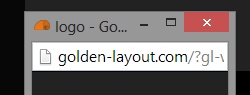
Your pop-up will display a location bar - which helps to avoid phishing attacks (opening something that looks like your bank login etc.) but takes up space for your web-app. Unfortunately this is a security feature and can't be turned off (even though there's a locationbar:'no' option when opening the window, but it will just be ignored).